Open & the six tabs
Why this matters: The PR Registry is the single place where the whole marketing team logs every piece of press coverage, every gifting or seeding record, every PR contact, and every media value calculation. Understanding the layout before you start entering data means you go to the right tab immediately and never lose a record in the wrong section.
How to reach it
- From the NNI homepage, click Marketing Space.
- On the Marketing Space hub, click PR Registry.
- You can also go directly to /marketing-space/pr-registry/.
- The page title reads 公關資料 / PR Registry with the subtitle "Media coverage, product seeding, vouchers, PR contacts and media value tracking".
The six tabs
Six tabs run across the top of the page. Each covers a different area of PR work:
- 媒體報道 / Coverage — Every piece of press coverage the team has logged: articles, posts, features, broadcasts. This is the main tab and opens by default.
- 贈品派送 / Seeding — Records of gifted products and vouchers sent to media contacts and influencers.
- 公關聯絡 / Contacts — The PR contact directory: outlets, editors, and influencers. Used to auto-fill recipient fields across other tabs.
- 媒體價值 / MV Calculator — A calculator that converts reach and follower data into an estimated Hong Kong dollar media value.
- 報表 / Report — Summary views and exports of all registry data.
- 媒體報價 / Rate Cards — Reference media rate cards for Hong Kong publications and channels.
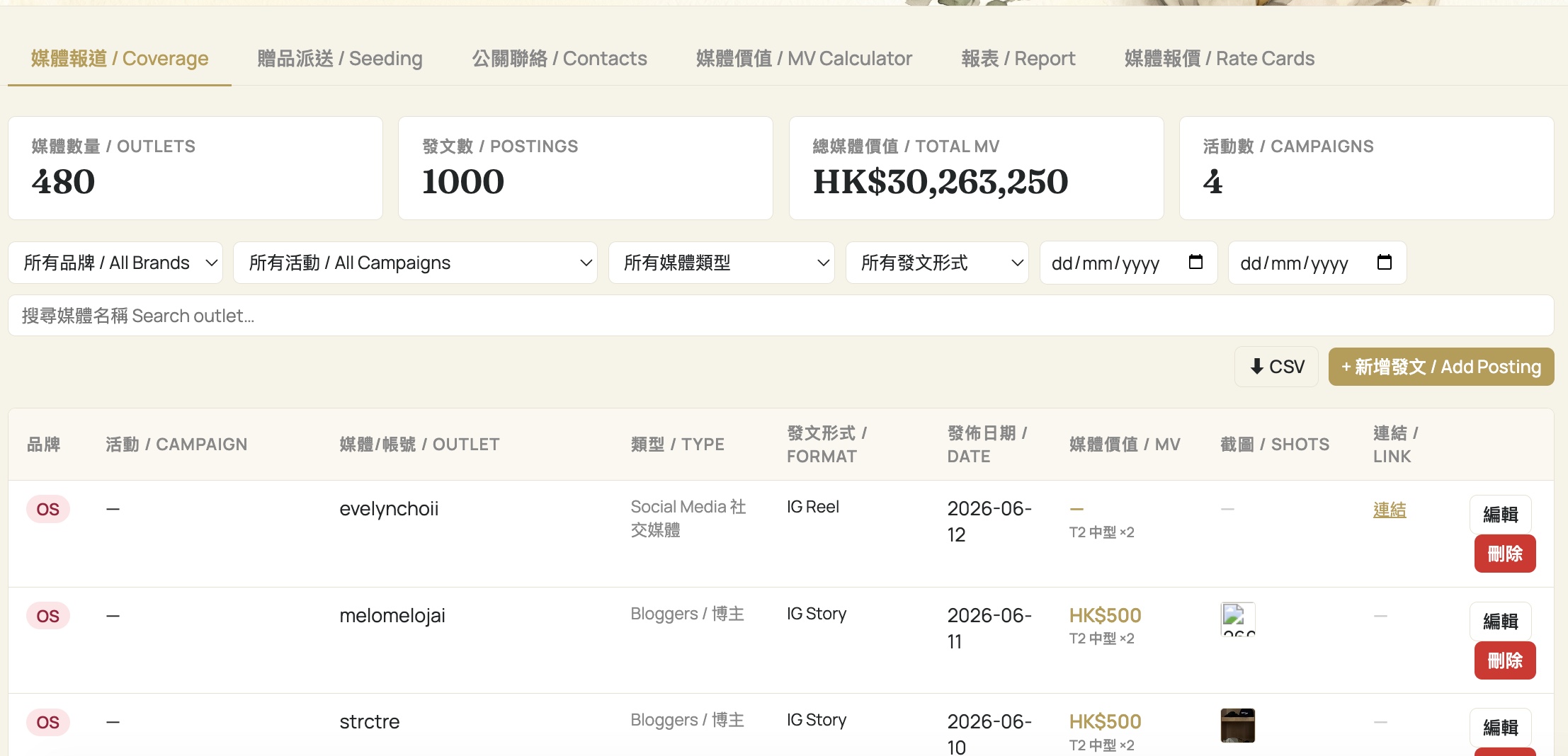
The Coverage tab in detail
Because Coverage is the most-used tab, it is worth understanding its layout before moving on.
At the top are four KPI stat cards:
- 媒體數量 / Outlets — how many distinct media outlets have covered the brand.
- 發文數 / Postings — total number of coverage entries logged.
- 總媒體價值 / Total MV — the combined estimated media value across all logged postings.
- 活動數 / Campaigns — how many campaigns have at least one coverage entry.
The filter row beneath the KPI cards lets you narrow the table by:
- All Brands — pick a specific brand to see only its coverage.
- All Campaigns — filter to one campaign.
- Media type and posting format dropdowns.
- A date-range picker (two date inputs: from and to).
- A search-outlet text box for finding a specific publication or channel.
The table columns are: Brand, Campaign, Outlet, Type, Format, Date, MV, Shots (screenshot thumbnails), Link, and an edit control.
Two action buttons sit above the table: ↓ CSV to export the filtered results, and + 新增發文 / Add Posting to log a new piece of coverage.
"I opened the page but the KPI cards all show zero."
Check whether an active filter is narrowing the results to nothing. The brand and campaign dropdowns retain their last selection. Reset all filters to "All Brands" and "All Campaigns" and clear the date range to see the full dataset.
開啟與六大分頁
為何重要:PR Registry 是整個市場推廣團隊記錄所有媒體報道、贈品及產品寄送記錄、公關聯絡人及媒體價值計算的唯一平台。在開始輸入資料前了解頁面佈局,可以讓你直接前往正確的分頁,避免將記錄誤存到錯誤的區域。
如何進入
- 在 NNI 主頁點擊 Marketing Space。
- 在 Marketing Space 主頁點擊 PR Registry。
- 你也可以直接前往 /marketing-space/pr-registry/。
- 頁面標題顯示 公關資料 / PR Registry,副標題為「 Media coverage, product seeding, vouchers, PR contacts and media value tracking 」。
六大分頁
頁面頂部有六個分頁,每個分頁涵蓋公關工作的不同範疇:
- 媒體報道 / Coverage —— 團隊記錄的每一篇媒體報道:文章、帖文、專題及廣播。這是主要分頁,頁面預設開啟此分頁。
- 贈品派送 / Seeding —— 向媒體聯絡人及影響者贈送產品和優惠券的記錄。
- 公關聯絡 / Contacts —— 公關聯絡人目錄:媒體機構、編輯及影響者。可自動填充其他分頁的收件人欄位。
- 媒體價值 / MV Calculator —— 將觸及人數和追蹤者數據換算為估算香港元媒體價值的計算器。
- 報表 / Report —— 所有資料庫數據的匯總檢視及匯出功能。
- 媒體報價 / Rate Cards —— 香港刊物及媒體渠道的參考媒體報價。
媒體報道分頁詳解
由於媒體報道是最常用的分頁,在繼續之前值得先了解其佈局。
頂部有四個 KPI 統計卡片:
- 媒體數量 / Outlets —— 報道過該品牌的不同媒體機構數目。
- 發文數 / Postings —— 已記錄的報道條目總數。
- 總媒體價值 / Total MV —— 所有已記錄報道的估算媒體價值總和。
- 活動數 / Campaigns —— 至少有一條報道記錄的活動數目。
KPI 卡片下方的篩選列可以縮小表格範圍:
- All Brands —— 選擇特定品牌,只顯示其報道。
- All Campaigns —— 篩選至某一個活動。
- 媒體類型及發文格式下拉選單。
- 日期範圍選擇器(兩個日期輸入框:開始及結束日期)。
- 搜尋媒體 文字框,可搜尋特定刊物或媒體渠道。
表格欄位包括:品牌、活動、媒體、類型、格式、日期、媒體價值、截圖、連結及編輯控制。
表格上方有兩個操作按鈕:↓ CSV 匯出已篩選結果,以及 + 新增發文 / Add Posting 記錄新的報道。
「頁面已開啟,但 KPI 卡片全部顯示零。」
檢查是否有已啟用的篩選條件將結果縮小至零。品牌和活動下拉選單會保留上次的選擇。將所有篩選器重設為「 All Brands 」和「 All Campaigns 」,並清除日期範圍,即可查看完整資料。