Open & orient
Why this matters: The Marketing Dashboard is the single place to see all five brands' sales, ad spend, traffic, and promotions in one view. Knowing how to open it and orient yourself — which brand tab, which month — is the foundation of every other task in this track.
Opening the dashboard
- From the intranet homepage at home.newnationhk.com, click the Marketing Dashboard card, or go directly to /marketing/.
- The dashboard loads the current month and the "All Brands" view by default.
- You will see a Brand tab bar across the top. The tabs are: All Brands · HT · KD · RAF · SO · OS. Click any tab to filter every number on the page to that brand only. "All Brands" shows the combined total.
- To the right of the brand tabs is the Month filter dropdown (
monthFilter). Click it and pick the month you want to report on. The whole page refreshes to that month's data.
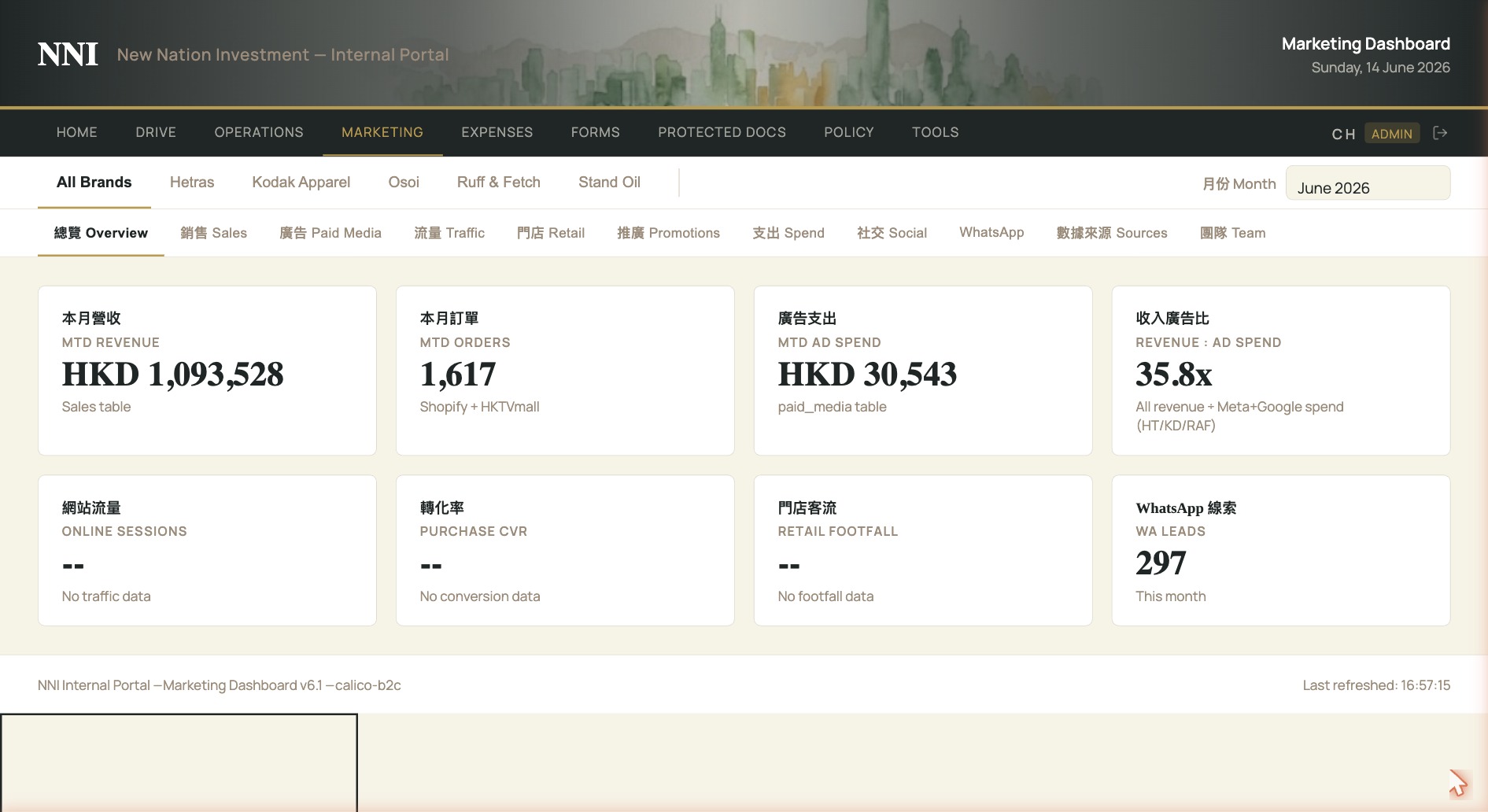
The 11-tab bar
Below the brand and month controls is the main content tab bar. It has 11 tabs — each one is a different view of the same period and brand you have selected:
- Overview (總覽) — headline KPIs at a glance
- Sales (銷售) — Shopify and HKTVmall revenue
- Paid Media (廣告) — ad spend and ROAS by channel
- Traffic (流量) — website sessions and source breakdown
- Retail (門店) — physical store performance
- Promotions (推廣) — active discount codes and campaign results
- Spend (支出) — online, offline, and budget totals
- Social (社交) — organic social media metrics
- WhatsApp — WhatsApp channel metrics
- Sources (數據來源) — where each number comes from
- Team (團隊) — team task and activity view
What "read-only" means
Almost everything on this dashboard is read-only — the numbers are pulled automatically from overnight syncs and you cannot edit them. A small number of tabs (Promotions and Spend) have input controls for setting targets; those are the only places where you type anything. You will not accidentally break the data by clicking around.
開啟與導覽
為何重要: Marketing Dashboard 是唯一一個能同時查看五個品牌銷售、廣告支出、流量及推廣數字的地方。掌握開啟方法及基本導覽 —— 選擇品牌分頁、選擇月份 —— 是完成本課程所有其他任務的基礎。
開啟 Dashboard
- 在 home.newnationhk.com 主頁點擊 Marketing Dashboard 卡片,或直接前往 /marketing/。
- Dashboard 預設載入當月數據及「 All Brands 」總覽。
- 頁面頂部有一排品牌分頁,包括:All Brands · HT · KD · RAF · SO · OS。點擊任何分頁,頁面上所有數字即會篩選至該品牌。選「 All Brands 」則顯示合計。
- 品牌分頁右側是月份篩選下拉選單(
monthFilter)。點擊後選擇所需月份,整個頁面會刷新為該月數據。
11 個內容分頁
品牌與月份控制項下方是主要內容分頁列,共 11 個分頁 —— 每個分頁以不同角度呈現你所選期間及品牌的數據:
- 總覽 (Overview) — 關鍵 KPI 一覽
- 銷售 (Sales) — Shopify 及 HKTVmall 收入
- 廣告 (Paid Media) — 各渠道廣告支出及 ROAS
- 流量 (Traffic) — 網站訪問量及來源分析
- 門店 (Retail) — 實體門店表現
- 推廣 (Promotions) — 有效折扣碼及推廣活動結果
- 支出 (Spend) — 線上、線下及預算總計
- 社交 (Social) — 社交媒體自然流量數據
- WhatsApp — WhatsApp 渠道數據
- 數據來源 (Sources) — 各數字的數據來源
- 團隊 (Team) — 團隊任務及活動檢視
「唯讀」代表甚麼
Dashboard 上絕大部分內容均為唯讀 —— 數字由隔夜同步自動拉取,你無法直接編輯。只有少數分頁(推廣及支出)設有輸入控制項供設定目標,那些是唯一需要輸入的地方。你可以放心點擊瀏覽,不會意外破壞任何數據。